
🧧 Lunar New Year Special: Get FlyCheck for 40% OFF ($5.99). Offer ends Feb 19, 2026.

Go / No-Go. Clarity at a glance.

Real-time decoded airport METARs for macOS. VFR and IFR weather monitoring from your menu bar.
(v1.6: The "Precision & Safety" Update is now live!)

Download on the App Store
On your phone? Send this to your Mac: 📩 Email myself the link

Requires macOS 14.0 (Sonoma) or later

As featured on
FlyCheck Menu Bar Interface
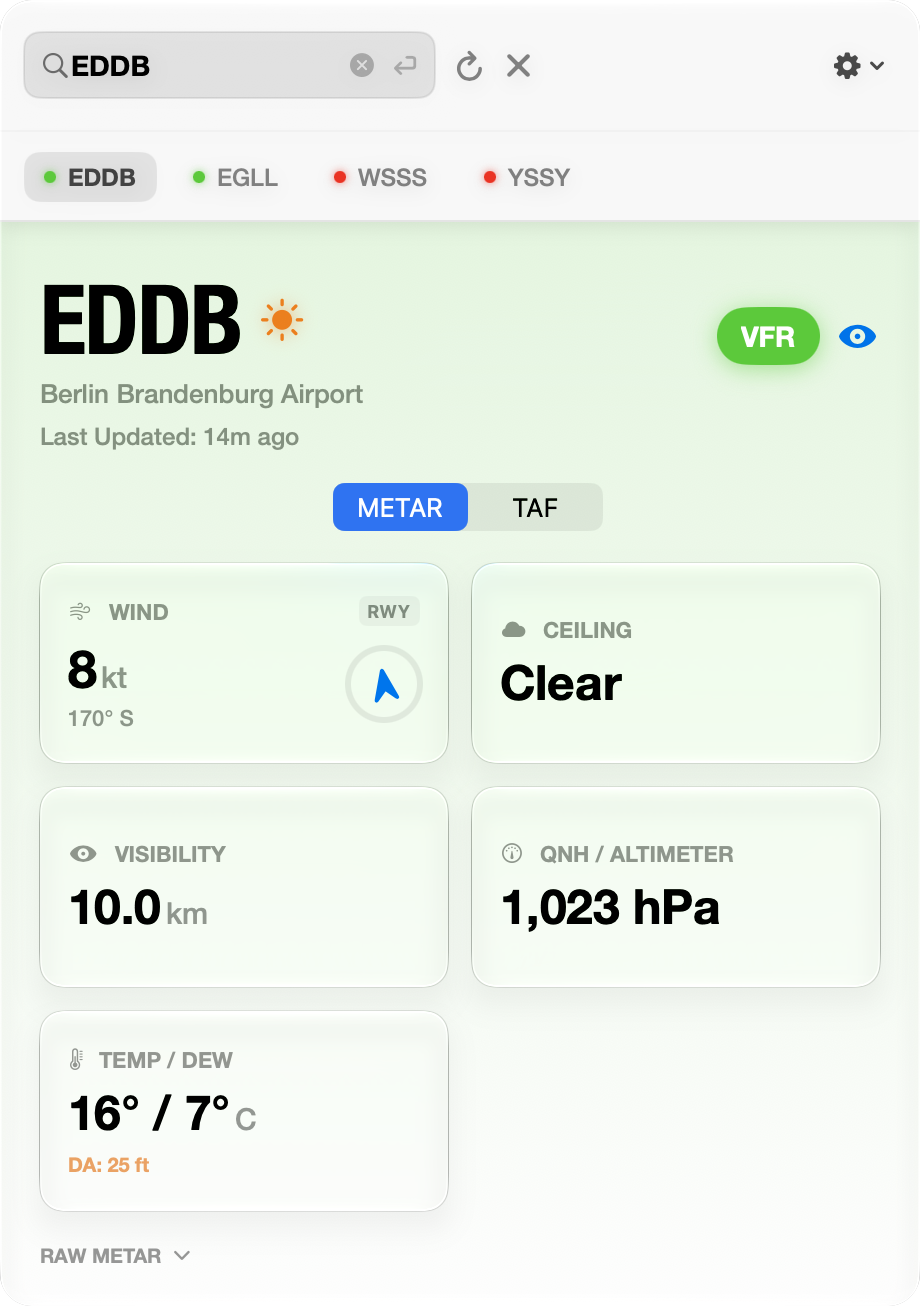
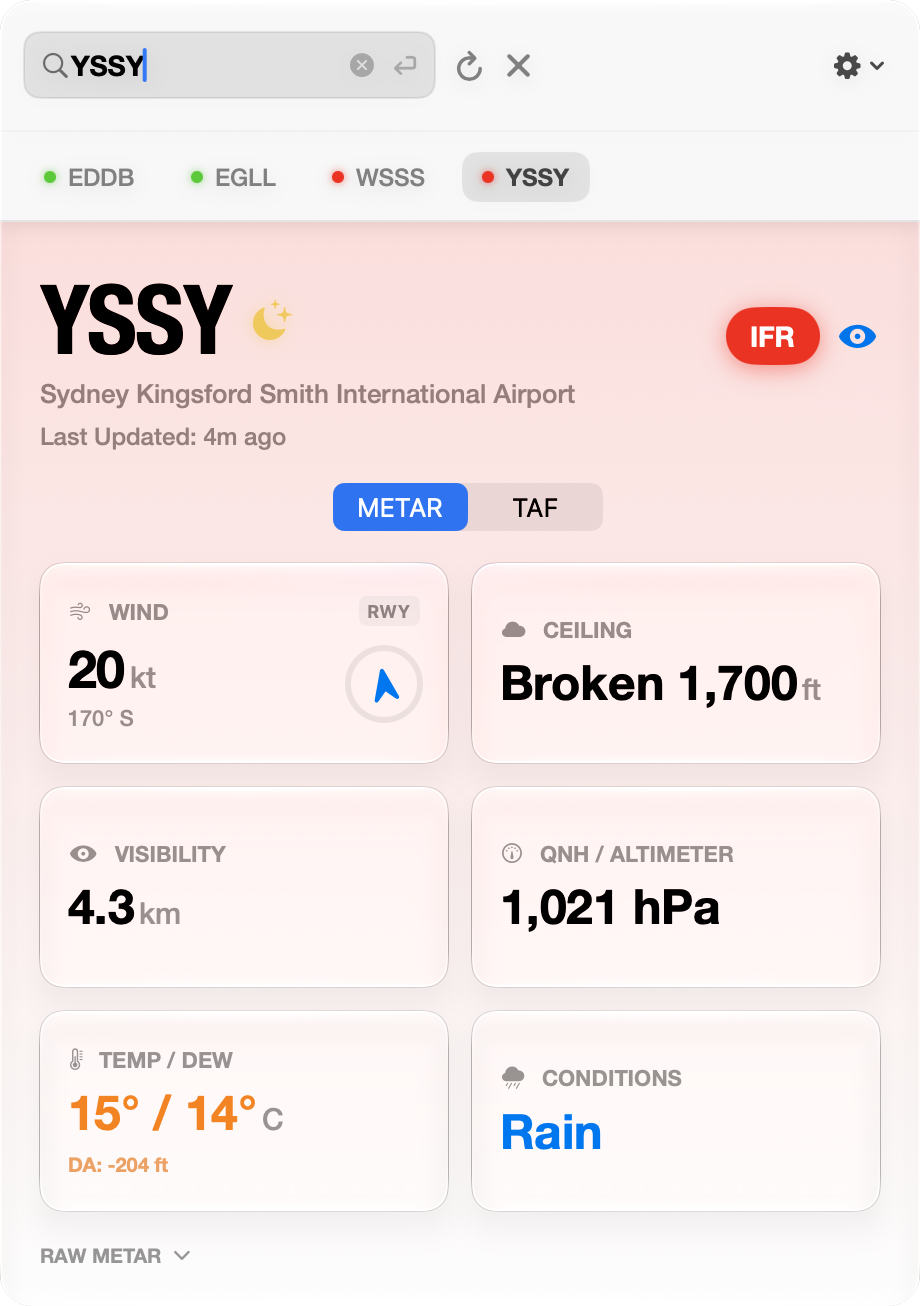
FlyCheck Main View - Berlin FlyCheck Main View - Singapore

Designed for your menu bar.
Loved by pilots everywhere.

Situational Awareness

The interface and menu bar icon change color based on flight rules (VFR, MVFR, IFR, LIFR) for instant recognition.

Solar & Atmosphere NEW

Real-time Density Altitude, Zulu time, and countdowns to Sunset/Twilight. Plus, intelligent unit switching (hPa/inHg).

Aa

Decoded Signage

Raw METARs decoded into high-contrast Helvetica Neue Condensed Bold. Mimics physical runway signage for instant legibility.

24L-06R

Multi-Station Watchlist

Track your destination and alternates in a high-contrast list. The menu bar icon automatically monitors the most critical station.

Search & Smart Paste

Smart autocomplete for ICAO codes. Plus, copy a code from ForeFlight or SkyVector and we detect it instantly.

Clipboard Detected
KJFK PASTE & GO ⏎

Visual Crosswind

Don't just read the wind; see it. Dynamic compass ring plus real-time Headwind and Crosswind calculations for instant Go/No-Go decisions.

Keyboard Optimized

Keep your hands on the yoke. Use global shortcuts to manage your cockpit.

⌘ F ⌘ R ESC

Private & Native

Zero tracking. No accounts. Pure SwiftUI. Instant launch. No Electron bloat.

Why FlyCheck?

Feature FlyCheck Web METARs ForeFlight Basic
Launch Speed Instant (0.1s) Slow (5s+) Slow (10s+)
Readability Visual Signage Raw Text Complex Charts
Architecture Native (No Electron) Electron / Web Heavy Frameworks
Visibility Always in Menu Bar Hidden in tabs Full screen only
Tracking/Privacy None Required Required
Offline Access Cached (Last Known) Connection Error Cached
Cost Model US$5.99 Lifetime SALE Free (Ad supported) US$100+/yr Subscription

The Berlin Story

"The story of how this app came to be is exactly what we love about many small Mac projects."

— ifun.de

I built FlyCheck in a Berlin hotel room while waiting for weather that never cleared. MVFR, occasional light snow, -5 degrees temps, overcast at FL10.

I was supposed to fly that day at EDAY Strausberg (it would have been my first time in a Skyleader 400!). Instead, I spent hours refreshing browser tabs, trying to track whether conditions might improve enough to make it to the airport. Every METAR check meant navigating to a website, typing the ICAO code, parsing dense text, and trying to spot the trend.

The anxiety of not knowing whether to wait or cancel is worse than bad weather itself.

So I built what I needed: instant weather checks from the menu bar. No tabs, no typing after the first search, no parsing cryptic abbreviations. Just the information pilots actually scan for — ceiling, visibility, wind, flight category — designed like the signs we already read on the ramp.

That flight never happened. But FlyCheck did.

Alan Soon

Pay once, not every month.

Lifetime License

US$5.99 Limited Time

Pay once, keep it forever. No subscriptions, no annoying recurring fees. Just a precise, engineered utility for your menu bar. All for the price of a coffee and two cookies. ($5.99 isn't going to make us rich but it might buy some 100LL.)

Download on the App Store

Privacy Policy

We don't want your data; don't need it, don't care about, wouldn't know what to do with it anyway. FlyCheck is a utility tool that does its job without tracking you.

1. Data Collection

No Accounts: You do not need to create an account.

No Analytics: We do not use third-party trackers.

No Device IDs: We do not collect UDIDs or IPs.

2. Location & Storage

No GPS: We do not access Location Services.

Local Storage: History & settings stay on your Mac.

Cache: Weather data is cached locally for speed.

3. Security & Services

CheckWX API: Direct HTTPS requests for weather.

Sandboxing: Restricted via macOS App Sandbox.

Encryption: All communication is secure.

4. Contact Us

Questions about this policy? Reach out directly.

alan@fractals.sg ↗

Latest Updates

v1.6

Latest Release (Feb 17, 2026)

The "Precision & Safety" Update. This release focuses on the data that matters most in the cockpit: wind gusts and accurate ceiling definitions.

New Features

  • Wind Gusts & Crosswinds: FlyCheck now displays gust data and uses it for worst-case crosswind calculations. Gusts are highlighted in orange for instant visibility.
  • ICAO Ceiling Standards: The Ceiling card now strictly follows FAA/ICAO definitions, identifying the lowest BKN/OVC/VV layer as the true ceiling.

Improvements

  • Weather Colors: Condition cards are now color-coded (Orange for TS, Cyan for Snow, Blue for Rain).
  • Wind Clarity: Added compass bearing labels (e.g., "270° W") below wind speeds for faster interpretation.
View Version History

v1.5

Released (Feb 17, 2026)

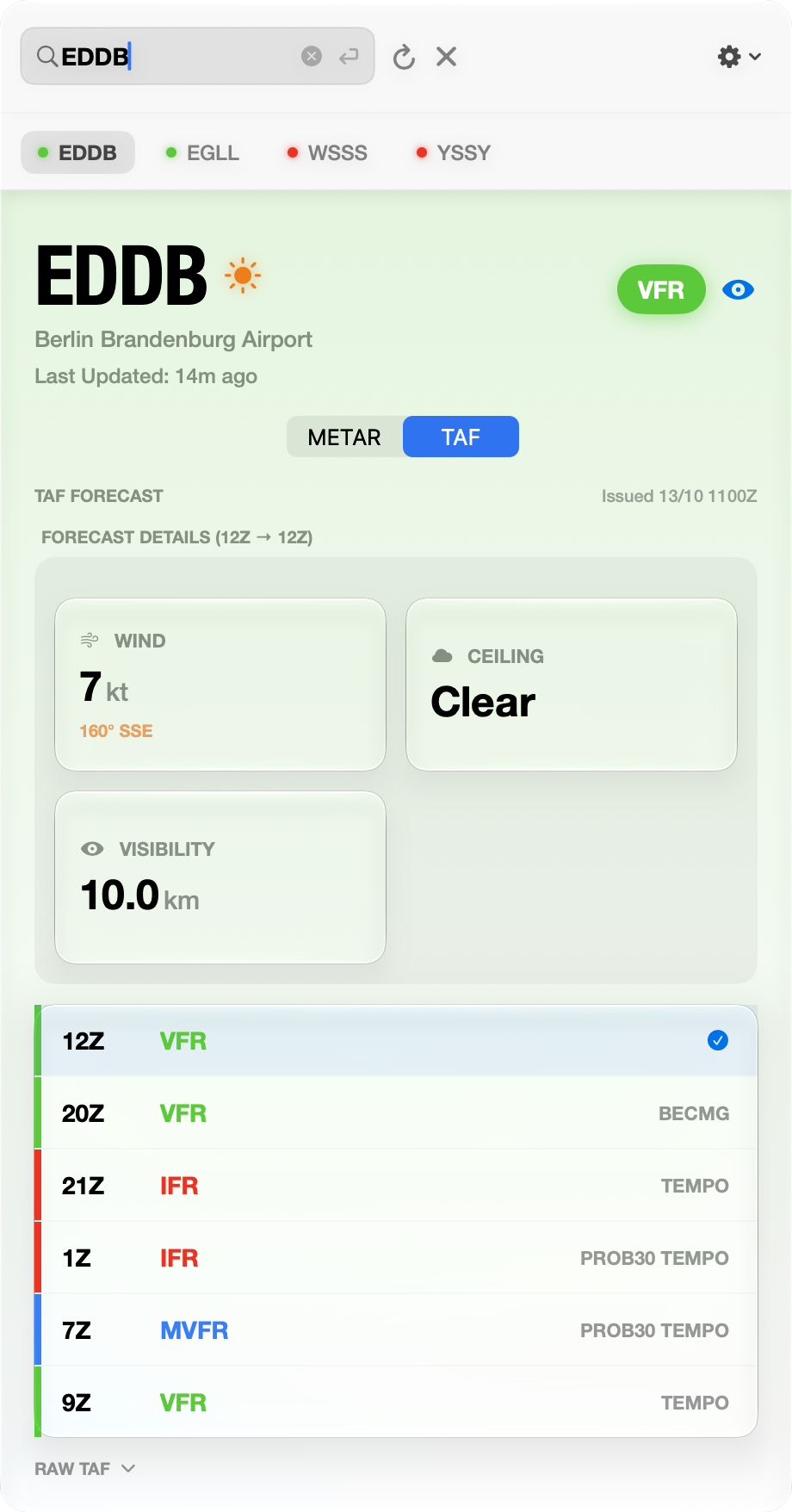
This major update introduces full Terminal Aerodrome Forecasts (TAF) with an interactive timeline to visualize changing conditions.

New Features

  • TAF Forecasts: Full Terminal Aerodrome Forecasts with an interactive timeline.
  • METAR/TAF Toggle: Easily switch between current conditions and predicted forecasts.

v1.4

Released (Feb 12, 2026)

Refining the workflow. This update focuses on smoother navigation, persistent settings, and eliminating friction in your daily briefing.

New Features

  • Menu Bar Sync: The menu bar now always displays the airport you are currently viewing in the main window, eliminating confusion.
  • Keyboard Navigation: Use Cmd+Option+Arrows to quickly cycle through your watchlist airports.
  • Persistent Runways: Your selected runway is now saved per airport, so it's ready when you switch back.
  • Search Polish: Added a clear button (x) to the search bar and widened the window for better visibility.
  • Clear Watchlist: Added a "Clear Watchlist" button in the settings menu to remove all monitored airports at once.
  • Tooltips: Added helpful hover text to the watchlist eye icon so you know exactly what it does.
  • Rate this App: Added a direct link in Settings to rate FlyCheck on the App Store. Your feedback helps us grow!
  • Check for Updates: Added a quick link to the App Store page to check for new versions.

v1.2

Released (Feb 8, 2026)

Expanding situational awareness beyond the departure gate with multi-station tracking and international unit support.

New Features

  • Multi-Station Watchlist: Track destination and alternates in a high-contrast list. Menu bar icon monitors the most critical station.
  • Density Altitude Monitor: Real-time DA calculations are now displayed on the Temperature card, helping you catch performance risks early.
  • Intelligent Unit Switching: Auto-toggle between inHg (North America) and hPa (International) based on ICAO prefixes.
  • Visual Crosswind: Real-time headwind and crosswind calculations integrated directly into the visual wind instrument.
  • Refined UI: Cleaner "Airport Signage" typography and improved dark mode contrast.

v1.3

Released with v1.4

Ensuring your weather data is always accessible. This update introduces smart data caching and a new onboarding flow for modern MacBook layouts.

New Features

  • Zero-Click Intelligence: FlyCheck now detects ICAO codes on your clipboard and pre-fills the search bar. One less step between you and the weather.
  • Reliable Instrumentation: No more "false failures." If the weather API is down, FlyCheck keeps your "Last Known" data visible with a clear offline warning.
  • Physical Feedback: New haptic impacts provide a satisfying "click" for unit toggles and successful fetches.
  • Built by You: Added a "Request a Feature" button in Settings. Your feedback now drives our flight plan.

v1.1

Released (Feb 7, 2026)

Focusing on time-critical situational awareness with solar calculations and standardized timing.

Features

  • The Twilight Line: Context-aware countdown to sunset and civil twilight (-6° solar angle).
  • Zulu Time Standard: One-tap toggle on the timestamp to switch between local and Zulu time.
  • Clean Cockpit UI: Decluttered dashboard header, removing redundant icons.
  • Scientific Precision: Replaced manual calculations with Apple’s native Measurement API.
  • Standardized Readouts: Unified rounding logic and enforced aviation-standard formatting.
  • Contextual Discovery: Tooltips on Search (⌘F) and Refresh (⌘R) buttons.
  • One-Tap Reset: Close (X) button in the header to clear data and cache.

The "Berlin" Build

Initial Release (Feb 5, 2026)

Welcome to the initial release of FlyCheck! A native macOS utility that puts real-time aviation weather (METARs) directly in your menu bar.

Features

  • Menu Bar Resident: See Flight Category (VFR/IFR) and Wind Speed at a glance without opening the app.
  • Decoded Data: Raw METAR strings are parsed into a high-contrast, legible "Airport Signage" design.
  • Smart Clipboard: Open the app with an ICAO code on your clipboard, and FlyCheck will offer to fetch it instantly.
  • Hybrid Search: Search by ICAO code or Airport Name (e.g., "Heathrow" → "EGLL").
  • Visual Wind: A dynamic compass ring visualizes wind direction relative to North.
  • Smart Fallback: If an airport has no weather station, FlyCheck automatically locates the nearest reporting station.
  • Global Units: Tap any card to toggle units (Knots/MPH, Celsius/Fahrenheit, InHg/hPa).
  • Native Performance: Built with SwiftUI for instant launch and minimal resource usage.
  • Privacy Focused: No accounts, no tracking, and no location services required.

The Horizon. What’s Next.

FlyCheck is a living tool. Your one-time US$5.99 purchase isn't just for today’s build. You're playing a part in a growing utility designed to eliminate every friction point in your pre-flight routine.

v1.7

In Planning

Expansion & Personalization. We're looking at ways to make FlyCheck even more tailored to your specific flying environment and preferences.

Planned Features

  • Nearby Station Discovery: Automatically identify and suggest reporting stations in your immediate vicinity (optional location-aware search).
  • Enhanced Widget Customization: More control over what data appears in your menu bar and how it's formatted.
  • Stability & Speed: Continuous refinement of the parsing engine for instantaneous updates.

Beyond the Menu Bar.

FlyCheck for Raycast

Available Now

Instantly look up the METAR for any airport with a 4-letter ICAO code. This extension provides real-time, decoded weather reports directly in Raycast.

Standalone extension. No FlyCheck app purchase required.
Powered by CheckWX (Free API Key required).

Get it on Raycast Store ↗
FlyCheck for Raycast Interface

Extension Features

  • Instant METARs: Get up-to-the-minute decoded data from the CheckWX API.
  • Detailed Breakdown: View Flight Category, Wind, Visibility, Temp, and Pressure at a glance.
  • Effortless Actions: Copy raw METAR or decoded JSON. Refresh instantly with ⌘R.
  • Search History: Quickly access your recently searched airports.

Get Updates

Occasional and short emails on new releases.
Zero spam.

Suggestions & Questions

Got an idea for the next update? Found a bug? I read and respond to every email.

alan@fractals.sg
✈️

You're on the list.

Thanks for subscribing. Keep an eye on your inbox for updates.